Using npm (Node Package Manager) with .NET MVC
, by Catalin Gavan
As the modern frontend development has greatly evolved in the past years, some once very popular JavaScript libraries like jQuery, Knockout.js, Moment.js, RequireJS, Bootstrap are now considered legacy.
But, many web applications still use the "legacy" web libraries successfully, either from technical constraints, or simply by preference. For example, Azure Portal, one of the most popular cloud providers, is currently using jQuery, Knockout.js and RequireJS for its web platform.
Since NuGet has never been great at managing UI libraries, I created a simple scaffolding setup for integrating npm (Node Package Manager) into .NET MVC web applications.
The stack looks like this:
- npm manages third-party JavaScript/CSS packages
- Gulp copies distributable files from
node_modulesintowwwroot - .NET MVC (Razor pages) - hosts the web application
The solution is simple yet very efficient. Additionally, no special static files configuration is needed for the .NET application, as other tutorials suggest.
Setup npm in your .NET web project
1. In your .NET web application project folder, create a package.json file.
{
  "name": "my-web-application",
  "version": "1.0.0",
  "scripts": {},
  "dependencies": {},
  "devDependencies": {}
}
2. If you haven't done this already, update the .gitignore file to exclude the node_modules folder which will soon be populated by the npm (Node Package Manager).
We also ignore the wwwroot\lib folder, as this folder will be populated automatically.
node_modules/
**/wwwroot/lib/

# other entries here
3. Install the libraries your application uses, by using the npm cli.
C:\Projects\MyApp\WebApplication.AspNetCore>
npm i jquery
npm i bootstrap
npm i bootstrap-icons
This will update your package.json file, and will download the respective libraries in the node_modules folder.
{
  "name": "my-web-application",
  "version": "1.0.0",
  "scripts": {},
  "dependencies": {
    "bootstrap": "^5.3.8",
    "bootstrap-icons": "^1.13.1",
    "jquery": "^3.7.1"
  }
}
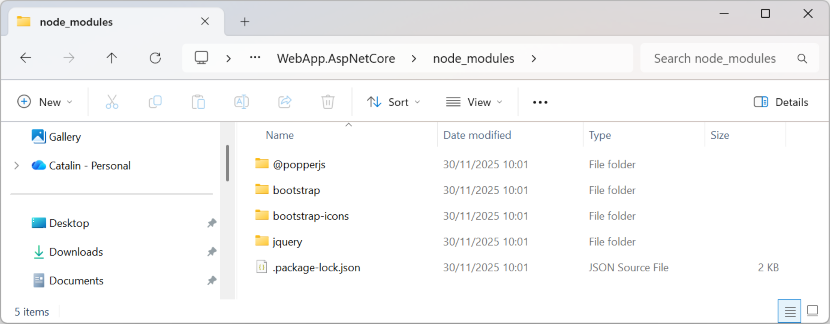
Files inside node_modules are not accessible to the .NET server
By default, .NET web applications expose only the files inside the wwwroot folder. Having the libraries (jQuery, Bootstrap, bootstrap-icons etc.) in the node_modules folder does not make them accessible for the web server yet.
However, copying the files into the wwwroot folder, would make them accessible:
http://localhost:5168/node_modules/jquery/dist/jquery.min.js - 404 NotFound
http://localhost:5168/jquery/dist/jquery.min.js              - 200 OK
If we can automate copying the files from node_modules to the wwwroot folder, we can fully benefit from the npm package manager for our .NET web application.
Copy files from node_modules into wwwroot
I used Gulp to automate copying files from node_modules folder into wwwroot\lib folder, thus making them accessible by the .NET web server (and implicitly for the browsers).
Beside helping with copying the files, Gulp can also be used to minify JavaScript files, compile *.scss files, combine and minify multiple .css files and many more automation tasks useful for a web application.
1. Install gulp as a dev dependency:
C:\Projects\MyApp\WebApplication.AspNetCore>
npm install gulp --save-dev
npm install gulp-rename --save-dev
This will update the package.json file:
{
  "name": "my-web-application",
  "version": "1.0.0",
  "scripts": {},
  "dependencies": {
    "bootstrap": "^5.3.8",
    "bootstrap-icons": "^1.13.1",
    "jquery": "^3.7.1"
  },
  "devDependencies": {
    "gulp": "^5.0.1",
    "gulp-rename": "^2.1.0"
  }
}
2. Create a gulpfile.js in your .NET web project:
const gulp = require('gulp');
const path = require('path');
const rename = require('gulp-rename');

gulp.task('copy-lib', function () {
    return gulp
        .src([
            './node_modules/bootstrap/dist/js/bootstrap.bundle.min.js',
            './node_modules/bootstrap/dist/css/bootstrap.min.css',
            './node_modules/jquery/dist/jquery.min.js',
            './node_modules/bootstrap-icons/font/**/*'
        ], { base: '.' })
        .pipe(rename(function (p) {
            const dirname = p.dirname.substring(`node_modules${path.sep}`.length);
            p.dirname = dirname;
        }))
        .pipe(gulp.dest('./wwwroot/lib'));
});
We define a Gulp task copy-lib which iterates over a list of node_modules files (or folders), and copies them into wwwroot/lib/*.
3. Update the package.json file and define a new gulp:copy-lib script action:
{
  "name": "my-web-application",
  "version": "1.0.0",
  "scripts": {
    "gulp:copy-lib": "gulp copy-lib"
  },
  "dependencies": {
    "bootstrap": "^5.3.8",
    "bootstrap-icons": "^1.13.1",
    "jquery": "^3.7.1"
  },
  "devDependencies": {
    "gulp": "^5.0.1",
    "gulp-rename": "^2.1.0"
  }
}
4. Run the gulp:copy-lib script:
C:\Projects\MyApp\WebApplication.AspNetCore>
npm run gulp:copy-lib

> my-web-application@1.0.0 gulp:copy-lib
> gulp copy-lib

[09:29:05] Using gulpfile ~\Projects\MyApp\WebApp.AspNetCore\gulpfile.js
[09:29:05] Starting 'copy-lib'...
[09:29:05] Finished 'copy-lib' after 66 ms
After running gulp:copy-lib task, we can now see that all the files have been copied into wwwwroot\lib folder:
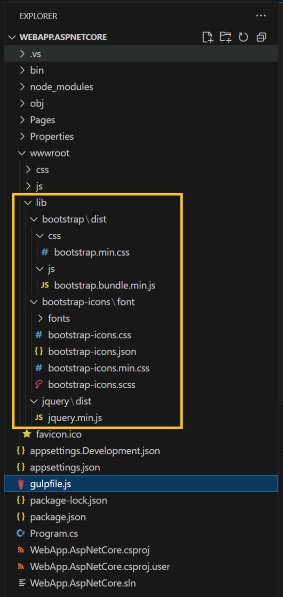
This means that they are now accessible to the .NET web server:
GET http://localhost:5290/lib/bootstrap/dist/css/bootstrap.min.css - 200 OK
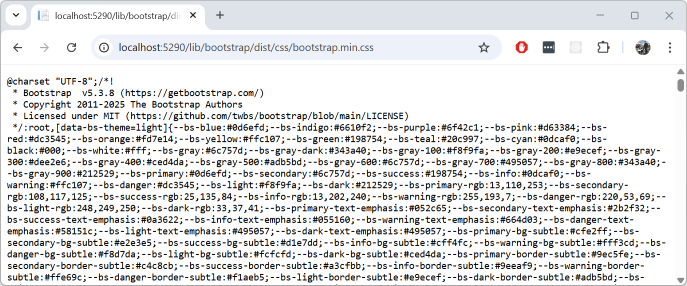
We can now import the library files directly from the wwwroot folder.
<!DOCTYPE html>
<html>
<head>
    <meta name="viewport" content="width=device-width" />
    <title>Web app</title>

    <link href="~/lib/bootstrap/dist/css/bootstrap.min.css" rel="stylesheet" />
    <link href="~/lib/bootstrap-icons/font/bootstrap-icons.css" rel="stylesheet" />
</head>
<body>
    <div class="container text-center py-5">
        <h1 class="display-6 py-2">
            .NET + <span class="fw-semibold">npm</span> + <span class="fst-italic fw-semibold text-danger">Gulp</span>
        </h1>

        <button class="btn btn-light" id="btn">
            Bootstrap button <i class="bi bi-gear-fill"></i>
        </button>
    </div>

    <script src="~/lib/jquery/dist/jquery.min.js"></script>
    <script>
        $("#btn").on("click", function() {
            alert("Hello world!");
        });
    </script>
</body>
</html>
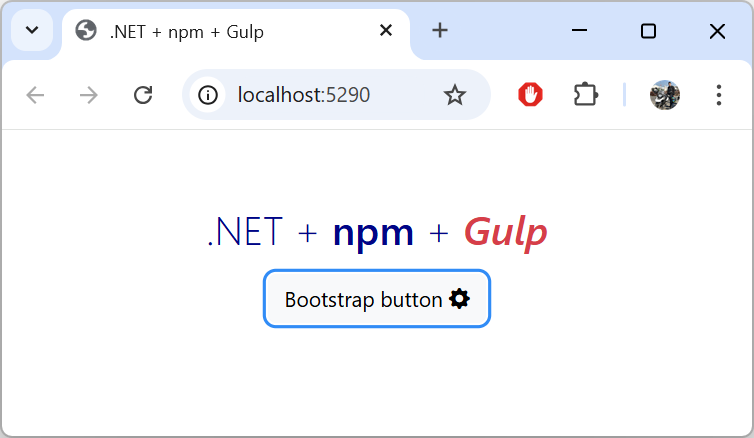
Final thoughts
Earlier, I suggested updating the .gitignore to ignore the /**/wwwroot/lib directory.
I don't think it is necessary to commit the library files, because they can always be downloaded and copied locally, using npm i followed by npm run gulp:copy-lib actions.
This practice also prevents accidental modifications inside vendor packages and ensures deterministic builds.
Additionally, this template works very well with CI/CD workflow.
name: Publish WebApp (simplified)
jobs:
  publish:
    runs-on: ubuntu-latest
    steps:
      - name: Checkout
        uses: actions/checkout@v4

      - name: Install node.js
        uses: actions/setup-node@v3
        env:
          NODE_ENV: localhost

      - name: Prepare wwwroot
        working-directory: ./src/WebApp.AspNetCore
        run: |
          rm -rf wwwroot/lib
          npm install
          gulp --color copy-lib

      - name: Setup .NET
        uses: actions/setup-dotnet@v4
        with:
          dotnet-version: 8.0.x

      - name: Build project
        run: |
          dotnet publish ./src/WebApp.AspNetCore/WebApp.AspNetCore.csproj --configuration Release --runtime linux-x64 --no-self-contained --output ./publish
          ls ./publish

      - name: Replace wwwroot
        run: |
          rm -rf ./publish/wwwroot
          cp -r ./src/WebApp.AspNetCore/wwwroot ./publish/

      # release the artifacts
With this approach, we don't need to manually download and copy library files in our (legacy) .NET web applications anymore. We can simply use Node Package Manager (npm) to manage the user-interface dependencies for our projects.